
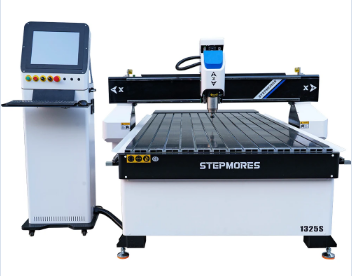
Define Your Woodworking Use Case Before Selecting a CNC Router
Before choosing a CNC router, identify your primary woodworking applications. This critical step prevents overspending on unnecessary capabilities or underinvesting in essential features. Consider these core project categories:
Furniture, Cabinetry, and Decorative Carving: Precision, Surface Finish, and Material Thickness Requirements
These applications demand exceptional precision (±0.005" tolerance) and flawless surface finishes to minimize post-processing. Key considerations include:
- Material Thickness: Hardwoods exceeding 2" require robust spindles (≥3HP) and rigid frames
- Surface Quality: High RPM capabilities (18,000–24,000 RPM) prevent tear-out in figured maple or cherry
- Detail Fidelity: Fine-detail carving requires precise ball-screw drives and vibration-dampened frames
Compromising on precision risks visible joinery gaps in cabinetry or chipped details in carvings.
Signage, Flat-Panel Milling, and 3D Relief Work: Axis Needs (3-Axis vs. 4-Axis) and Depth Control
Flat-panel processing thrives on 3-axis CNC routers, while dimensional work benefits from 4-axis capabilities:
- 3-Axis Systems: Efficient for through-cuts in signage and sheet goods, with depth consistency being critical
- 4-Axis Routers: Enable continuous rotary carving for 3D sculptures and complex moldings
- Depth Management: Z-axis resolution below 0.001" ensures smooth transitions in multi-level relief carvings
For architectural elements like crown moldings, 4-axis machines reduce setup time by 60% compared to manual repositioning.
Assess Core CNC Router Specifications That Impact Woodworking Performance
Spindle Power, RPM Range, and Dust Collection Integration for Clean, Splinter-Free Cuts in Hardwoods and Plywood
Getting enough spindle power matters a lot when working with hardwoods. Most folks find that starting around 3 HP works pretty well for keeping things moving without causing burn marks or annoying chatter during cutting. The machine needs to handle different speeds too. Look for something with an RPM range somewhere between 8,000 and 24,000 because this lets workers adjust based on what kind of bits they're using and how dense the wood actually is. This makes all the difference when dealing with thin sheets of plywood where splinters can ruin a whole project. Dust collection isn't just nice to have either. Good systems really do catch most of those tiny particles floating around. Some top models grab over 95% of the mess, which means less time spent cleaning up later and fewer respiratory issues from inhaling sawdust. Plus, surfaces stay cleaner looking throughout the process. When working with materials prone to tear out such as MDF or certain types of softwood, having control over speed becomes critical. Adjusting settings properly helps prevent those frustrating frayed edges. And let's not forget about tool longevity either. According to recent findings from the Woodworking Safety Report, proper dust management actually extends blade life by approximately 30% simply by cutting down on abrasive wear over time.
Frame Construction (Steel vs. Aluminum) and Drive System (Stepper vs. Servo) for Vibration-Free Accuracy at Speed
The rigidity of the frame really affects how stable it stays when loaded. Welded steel frames tend to resist bending during fast operations, while aluminum frames are lighter but can bend and become inaccurate over time. When it comes to drive systems, they matter just as much. Servo motors with their closed loop feedback keep things positioned accurately even when moving quickly, which beats out stepper motors that sometimes skip steps when pushed hard. The lack of vibrations makes all the difference for detailed work like fine carvings or parts needing tight tolerances. Steel frames actually cut down on harmonic vibrations by around half compared to other materials, so they handle heavier spindles better too. And those servo drives? They give much better control over torque, which means faster production times for tough woodworking jobs without sacrificing quality.
Match CNC Router Size and Type to Your Workspace, Budget, and Production Scale
Picking out the right CNC router boils down to matching three main things: where you have room to put it, what kind of money you can spend, and what actual work needs doing. Start by checking out the space available. Desktop models work great in small shops around 100 square feet or so, but if someone wants an industrial router, they'll need at least 200 square feet plus good airflow since these bigger machines generate quite a bit of heat. When it comes to spending cash, most folks start with entry level stuff between $2k and $10k for basic hobby projects. Mid range options run from $10k up to about $50k and handle maybe 10 to 20 sheets each day. Heavy duty systems cost $50k and beyond, capable of knocking out over 50 parts hourly. Size matters too. A standard 4 foot by 8 foot bed works well for full sized plywood sheets, while smaller 2x3 setups are fine for intricate carvings or smaller projects. Anyone planning serious hardwood work should go for a steel frame model though. These frames cut down on vibrations that mess with accuracy when running long jobs straight through.
Ensure Seamless Software Workflow: CAM Compatibility and User-Friendly CNC Router Control
Beginner-Friendly Interfaces, Real-Time Toolpath Simulation, and Pre-Built Wood Joinery Libraries
When looking at CNC router software, go for something with an easy to navigate interface if possible, especially when training new staff members who might not be familiar with all the technical stuff yet. The newer machines come with real time tool path simulations now, which lets people see exactly what will happen before making actual cuts on expensive materials. Studies suggest this can cut down on wasted wood by around 30%, though numbers vary depending on the shop size and project complexity. These simulations help spot potential problems too, like when two parts are going to collide during cutting or there's a flaw in the design itself for those working with hardwoods or plywood. For shops doing lots of intricate joinery work, finding software with built in template libraries makes life much easier. Most good programs already have standard joints like dovetails and mortise and tenons ready to use, so craftsmen don't have to start from scratch every time they want to make something fancy. Getting CAD CAM systems that talk directly to the machine control is another smart move since it means no messing around with file conversions that often lead to mistakes. And honestly, nobody wants to deal with manually editing G code anymore anyway. Look for software that handles post processor optimization automatically so everything works smoothly regardless of whether someone is working with softwoods or hardwoods.
FAQ
What factors should I consider when choosing a CNC router for woodworking? Consider your primary applications, such as furniture making or signage, and evaluate spindle power, RPM range, frame materials, and software compatibility.
How does CNC router size affect my projects? CNC router size needs to match your workspace and budget. Desktop models fit small areas, while industrial routers require more space and can handle larger projects.
Why is dust collection important in CNC routers? Effective dust collection reduces cleanup time, improves air quality, and extends tool life by minimizing abrasive wear on cutting blades.
Table of Contents
- Define Your Woodworking Use Case Before Selecting a CNC Router
- Assess Core CNC Router Specifications That Impact Woodworking Performance
- Match CNC Router Size and Type to Your Workspace, Budget, and Production Scale
- Ensure Seamless Software Workflow: CAM Compatibility and User-Friendly CNC Router Control